

The problem, stated plainly
EDI covers your largest customers. The web store covers the ones who will use it. Everyone else emails a purchase order to the same address they have used for years, and somebody on your desk reads it and types it into the ERP.
That work scales with sales rather than with headcount, which is the wrong direction: a good quarter makes the desk worse. It also concentrates in specific people — when the person who knows what a particular customer’s shorthand means is away, the orders still arrive and the knowledge does not.
What happens, step by step
The order arrives as it always has
A repeat customer emails a purchase order — a PDF from their ERP, a spreadsheet a buyer maintains by hand, a scan, or six lines typed into the email body. Nothing changes for them.
Every line is resolved against your catalog
Their part number or free-text description is matched to your SKU, with the match reason and confidence kept visible beside the decision. Confirmed aliases are remembered for that customer only — one buyer's shorthand never applies to another's orders.
Units and pack sizes are converted in the open
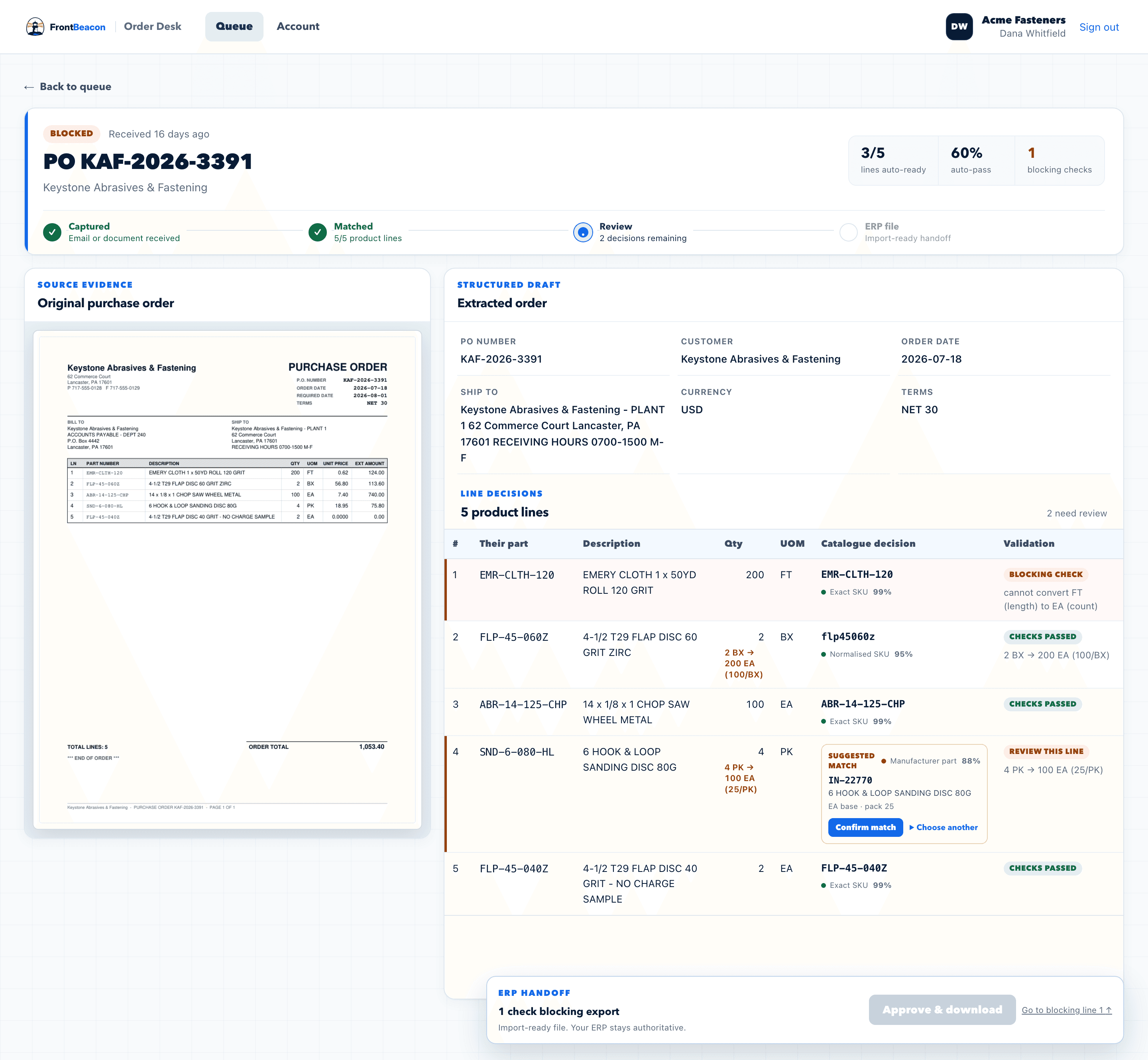
Per-thousand and per-hundred quantities, box and carton conversions, and pack semantics are resolved against the item record and the arithmetic is shown. Where a conversion is impossible — feet to eaches, without a length per piece — the line blocks instead of producing a number.
A person on your desk approves it
The draft sits beside the original document. Your reviewer confirms or corrects, and anything blocked has to be resolved before the order can move. Nothing is released automatically.
Your ERP gets an import-ready file
An approved file in the layout your system accepts. Your ERP applies price, credit and availability and remains the system of record throughout.
What it will not do
This list is as much of the product as the one above. A system that quietly makes commercial decisions is not saving you work, it is moving the risk somewhere you cannot see it.
- Set or change pricing
- Approve credit or check credit limits
- Commit or allocate inventory
- Choose substitutions for unavailable items
- Calculate tax or freight
- Communicate with your customers
- Release orders without a person approving them
The part worth understanding before anything else
Most order automation is sold on how much it processes without a human. That number is easy to improve dishonestly — assume an unfamiliar unit means each, pick the more likely of two SKUs, default a missing field — and every one of those shortcuts produces an order that looks correct and is not.
FrontBeacon blocks instead. An unrecognised unit of measure stops the line. An ambiguous match stops the line. A blocked line holds its whole order, because an order is only shippable if every line on it is right. That reports a lower automation rate than products which guess, and it is the entire point.
What the first two weeks look like
| When | What happens | What it costs you |
|---|---|---|
| Day 1 | You send 15–25 redacted purchase orders. Redact anything you would rather not share. | About twenty minutes |
| Days 3–5 | You get the Accuracy Snapshot: what matched, what did not, and why — every field beside the original page, with a confidence score. | Nothing |
| Week 2 | If the snapshot is good, we agree the handoff format for your ERP and how orders reach us. If it is not, you have lost a morning and gained a report on your own documents. | A conversation |
Where it does not fit
Worth saying before you spend time on it. FrontBeacon is the wrong tool if most of your orders already arrive cleanly through EDI or a web store, if emailed volume is low enough that it is an occasional interruption rather than a daily task, if your orders require drawings, bills of materials or engineering judgement to price, or if what you actually want is a system that makes commercial decisions on its own.
In any of those cases the arithmetic does not work and we will say so on the call rather than after a pilot.
Common questions
- Does this replace our ERP?
- No. Your ERP remains authoritative for pricing, credit, availability, tax, freight and order release. FrontBeacon prepares a reviewed draft and an import-ready file; it does not decide commercial questions and it does not release orders.
- Do you need access to our ERP or our inbox?
- Not for the Accuracy Snapshot, which is the first step. That runs on redacted purchase orders you send us, with no connection to any of your systems. If you go further, any inbox route, file transfer or catalog export is agreed with you before it is used.
- What happens when it is not sure?
- The line blocks and says why, and the order does not become an import file until a person resolves it. An unrecognised unit of measure is not defaulted to each. Two plausible SKUs are not silently reduced to one. This is the behaviour the whole product is built around.
- Do our customers have to change anything?
- No. They keep emailing the same document they have always emailed. The change is entirely on your side of the desk, which is the main practical difference between this and an EDI project.
- How long until we know whether it works on our documents?
- 3–5 days. Send 15–25 redacted purchase orders and you get back what matched, what did not, and why — with every extracted field shown beside the original page.
- What does it cost?
- $1,995 per month, flat. No per-document charge, no per-customer-format charge, no implementation fee. The Accuracy Snapshot before it is free.
- Who is behind it?
- FrontBeacon is built by Muhammad Ali Shahbaz. It is a small, focused product rather than a platform, and it does one step of your workflow rather than promising to replace it.
Next
- Pricing$1,995 per month, flat. What is and is not included.
- For fastener distributorsPer-M and per-C quantities, pack semantics, plating callouts, cert requirements.
- ERP handoffsProphet 21, Eclipse, SX.e, Inform, ERP-ONE and The Business Edge.
- Why not just more EDI?EDI covers the customers worth a project. This is for the rest.
Questions this page did not answer? Ask directly. Please do not send purchase orders, customer data or credentials in a first message.